Groups
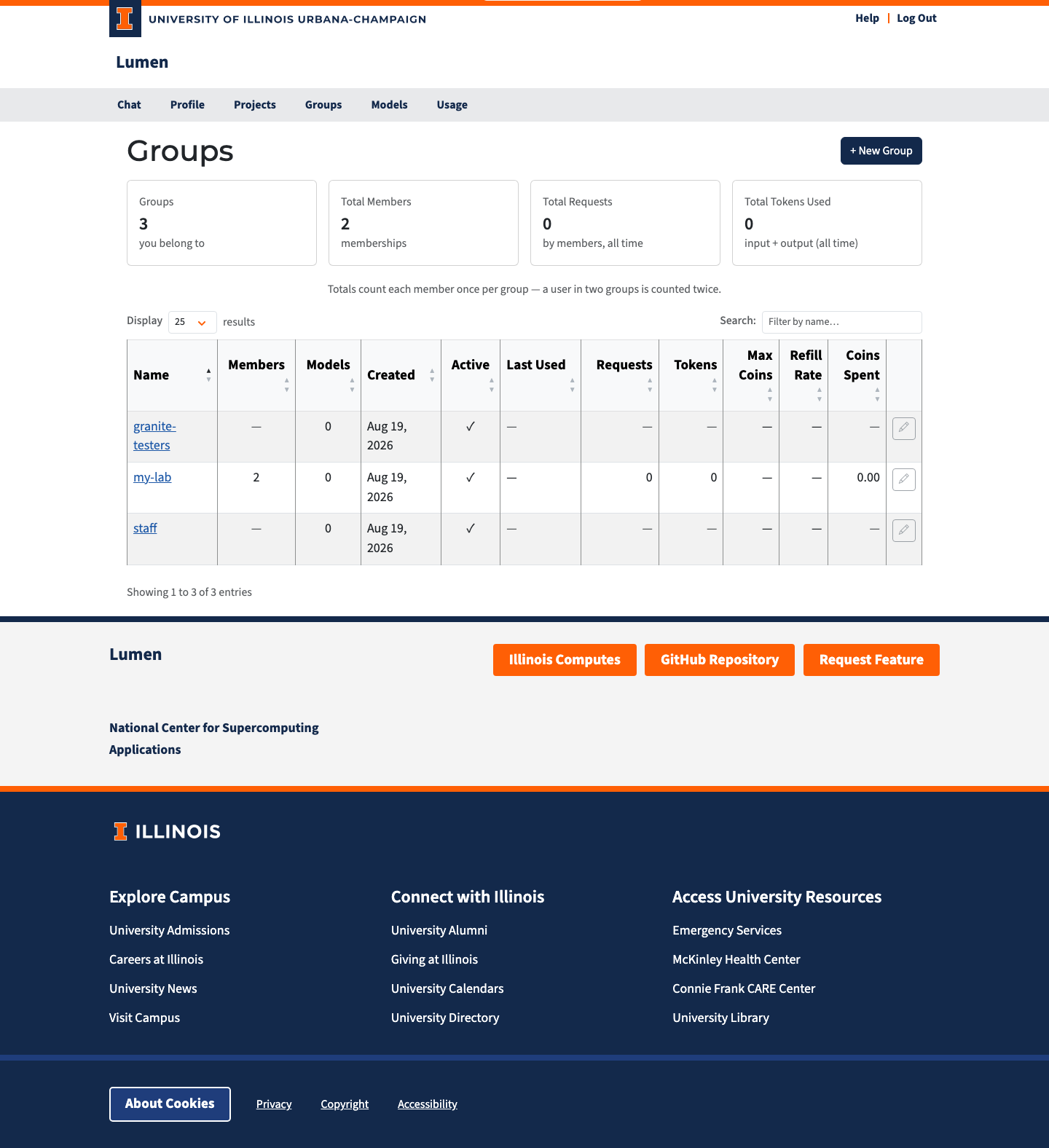
The Groups page (/groups) is where you manage groups — named collections of users and projects that share a coin budget policy.
What Is a Group?
A group bundles members together so that policy can be applied once instead of per person:
- Coin policy. A group can carry a coin budget (Max Coins and a Refill Rate). Every member inherits it unless they have a budget of their own. The group does not hold a shared balance — each member gets their own balance governed by the group's policy.
- Model access. Groups do not grant model access; a group carries only a coin policy.
Groups are primarily used to set up coin distribution. In practice there are two kinds:
- Auto-join groups that you are placed in automatically when you log in, based on your login claims (for example your affiliation). These give everyone from the same place the same coin policy.
- Groups created by administrators to raise the coin limits of specific users, for example a research team that needs more usage than the default.
Members can be users or projects. A project is its own identity for API traffic, so a project member inherits the group's coin policy for requests made with the project's API keys.
Who Can See What
| Role | Visibility |
|---|---|
| Admin | All groups in the system, including members for every group |
| Member | Only groups they belong to |
The Groups page is always available to signed-in users, but only administrators (in admin mode) can create groups.
Groups with no owner
A group with no owner has nobody accountable for its membership — typically a large auto-join group populated by login rules. For those groups the member list is hidden from everyone except administrators. This stops a large auto-assigned group from becoming a way for any member to browse the whole user directory.
Everything that affects you as a member stays visible: the group's name, whether it is active, how many members it has, and its coin policy. Assigning an owner makes the member list visible to members again.
Summary Cards
| Card | Description |
|---|---|
| Groups | Number of groups visible to you |
| Total Members | Combined memberships across those groups |
A member who belongs to two groups counts toward both.
Group Table
| Column | Description |
|---|---|
| Name | Clickable link to the group detail page |
| Members | Number of users and projects in the group |
| Created | When the group was created |
| Active | Green checkmark for active, red X for deactivated |
| Max Coins | The group's coin ceiling per member (∞ = unlimited, — = no group pool) |
| Refill Rate | Coins added per hour under the group policy |
Click any column header to sort. Use the search box to filter by name.
Each row has an edit (pencil) button and an activate/deactivate button, enabled for the group's owner and for admins. Other members see the pencil disabled with a note explaining why.
Auto-join groups
A group can auto-join members: administrators define rules on the group's Rules tab (or when creating the group), and anyone whose login claims match all of the rules is added at sign-in — and removed again when they stop matching. An auto-join group is fully automatic: it has no owner, and members cannot be added or removed by hand — the rules alone decide membership. See Group Management for details.
Creating a Group
Only administrators with admin mode enabled can create groups; the + New Group button is hidden for everyone else.
- Click + New Group.
- Enter a name, and optionally a description.
- Optionally pick an Owner (leave it blank for a group with no owner) and set Max Coins / Refill Rate for the group's coin policy.
- Click Create.
You are redirected to the new group's detail page.