Models
The Models page (/models) shows every AI model available to you in your Lumen instance, along with its pricing and current health. Models that are owned by another user are not listed, and their detail URLs return Not Found without exposing metadata. Disabled, expired, and deleted models are hidden the same way.
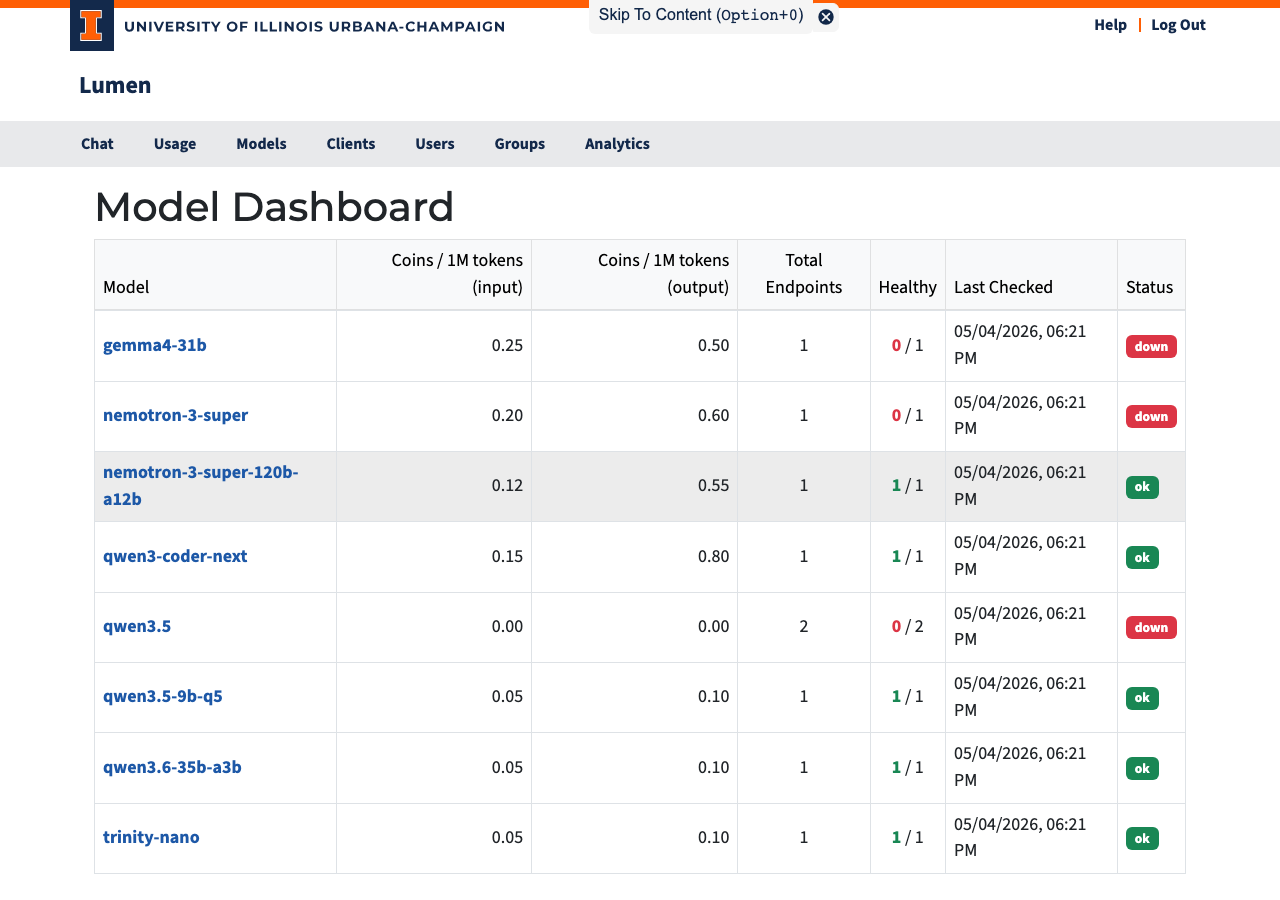
Table Columns
| Column | Description |
|---|---|
| Model | Clickable name — links to the model detail page |
| Input | What the model accepts, one pill per modality (text, image, audio) — a dash means the instance hasn't published modality info |
| Coins / 1M tokens — Input | Cost per million input tokens |
| Coins / 1M tokens — Output | Cost per million output tokens |
| Checked | How long ago the most recent health check ran (e.g. 5 min. ago); hover over or tab to it for the full date and time. It updates every minute while the page is open. Never means no check has run yet |
| Status | Current availability (see below), followed by how many of the model's backend servers are currently reachable out of the total configured (e.g. ok 4/4, degraded 2/4) |
| Access | Whether you must acknowledge the model's terms before use, or granted once you have (see below) |
Status Badges
| Badge | Meaning |
|---|---|
| ok (green) | All backends are healthy — model is fully available |
| degraded (yellow) | Some backends are down, but at least one is working |
| down (red) | No backends are reachable — model is temporarily unavailable |
| disabled (gray) | Model has been turned off |
| no endpoints (gray) | No backends have been set up for this model |
Models with no endpoints show the badge alone, without a healthy count.
In the Access column, models that require a one-time acknowledgment show an acknowledge pill, and early-access models show an early access pill — these models may change or be removed at any time, and you must acknowledge that before using them. Click either pill to open the acknowledgment dialog, which shows every notice that applies to the model; Accept & Enable records your acknowledgment and the pills are replaced by a green granted pill; click granted to see the notices you accepted and when you acknowledged them. Cancel leaves the model unchanged. If a model gains a new requirement after you acknowledged it, its pills appear again until you acknowledge the new terms. Models without requirements leave the column empty. A model with an end date disappears from this page once the date passes.
Understanding Pricing
Coins are Lumen's internal currency. See the Introduction for a full explanation of how tokens and coins relate. The prices shown here are per million tokens — typical single messages cost a small fraction of that.
Models with higher output rates tend to be more capable or larger. If you are cost-sensitive, compare models on the detail page before running a long batch job.